Minion 4

Open Beta for Minion 4 (ESO only).

Why is it here and not on ESOUI/MMOUI? Version 4 has been in the works for a looooong time, but the admins over there sadly don’t have time to support it right now and it has been on ice for far too long. With the upcoming console addons introducing dependency handling, I decided something has to be done, so I asked if I can upload it here for the time being.

That being said, if you want to support future work on Minion 4 please consider becoming a patron!

WARNING: There be bugs. Use this software at your own risk! Make sure you read the Known Issues below before installing!

If you want to report an issue, please use the Minion 4 forum over on ESOUI.

Features:

  • dependency handling – libraries are now installed automatically
  • suggested actions – clean up unused libraries, migrate to optional patches by other authors, repair addons that are missing files
  • manuall addon installation detection – automatically recognizes when something has changed in the AddOns folder
  • project content view – shows bundled addons, libraries and their dependencies
  • improved design – leaves more space for the actual content
  • new dark theme – for people who value their eyes
  • improved bbcode support – addon details and changelogs now look (almost) like on the website
  • http cache – all web resources are cached locally for faster access
  • addon update log for any modifications, not just auto updates anymore
  • upgraded to Java 17 – guess you can figure out how long it has been on ice now
  • several command line arguments for advanced control over how Minion behaves
  • much faster start time
  • new installer
  • support for multiple languages

    Translation status

  • and countless other improvements

Known Issues:

  • WOW support is currently in the experimental stage
  • the new design is a work in progress (especially the classic theme)
  • some menus have not been updated yet (backups, global settings, etc)
  • addon update log currently often shows an addon has been uninstalled when it was updated
  • memory usage has not been optimized yet, so it may use up more RAM than Minion 3
  • sometimes Minion will show suggestions that don’t appear to make sense (e.g. a migration to an older addon version). There is a million reasons why this can happen, but most likely it has something to do with the AddOnVersion specified in the manifest file by the addon author.
  • when updating from Minion 3, you will currently see a dialog asking you if you want to delete your data. If you want to keep your version information, you should press no, otherwise Minion 4 will have to reinstall all addons.

You can find the changelog here

Version: 4.1.3
Uploaded: 2026-09-12 18:34
Windows
SHA256 Checksum:
bc8efab0c1406c37612c5857e58539f4800457bf97ad54da4a2dcfb867c6e177
Download
macOS
SHA256 Checksum:
74bea09e2485788e4ded9052d31aa21e00ed0132df45ccb08e311e4d2b2f0b0b
Download
Linux (.deb)
SHA256 Checksum:
fe6597b1e68107ce65b9ad176f68ad2694d529e767c891c871c333eeb95fe777
Download
Linux (.rpm)
SHA256 Checksum:
eec304d8737b47480f7821c4ccd466ff9643cc7d9e2655747af4d32c9382ad59
Download
Linux (.tar.gz)
SHA256 Checksum:
f6278da98d471462ba4926e167488a688a92e745c58ef21988bf4c4a94c73263
Download

AwesomeGuildStore

Exclusive early access version of AwesomeGuildStore. Any major and minor version will be uploaded here first and sometime later on ESOUI. Patches for already published versions will still be uploaded to ESOUI immediately.

Version 1.6.1 changes:

  • Fixed several issues when the server sends its initial response before the store has finished initialization
  • Fixed error when using server side sort orders other than the default one
  • Fixed guild owner info getting mixed up when visiting multiple kiosks
  • Fixed search list showing on other tabs in some cases
  • Updated German translations

Version 1.6 changes:

  • Fixed search results not automatically filtering newly learned motifs (and similar) between store visits
  • Fixed missing icons on jewelry trait filter
  • Fixed underlying cause for “guildState not correctly initialized” messages in chat
  • Updated text filter autocompletion to only show results relevant to the currently selected filter categories
  • Updated how server responses are handled
    • NOTE: This should fix several cases of activities getting stuck
  • Updated how the trading house UI is opened
    • NOTE: The UI will now show instantly in a locked state while waiting for the server to respond (no more random waiting times before it shows!)
  • Improved performance on first store visit
  • Updated sell tab to allow listing items from the bank while at a banker NPC
  • Updated guild info scene so it allows to go back without closing out of the interaction while at a store
  • Updated item style filter for High isle

This version will be released to ESOUI on Monday, June 6th 2022.

Version: 1.6.1
Uploaded: 2022-05-30 23:30

To download this content, you must be a member of sirinsidiator's Patreon at $2 or more

QuickRez

Pressing the keybind will automatically select the closest keep or forward camp for respawn. The button text will also show any remaining time before you can again resurrect at a forward camp when it’s on cooldown.

Version: 1.0
Uploaded: 2020-06-29 21:36
To download this content, you must be a member of sirinsidiator's Patreon at $10 or more

ChromaSupport

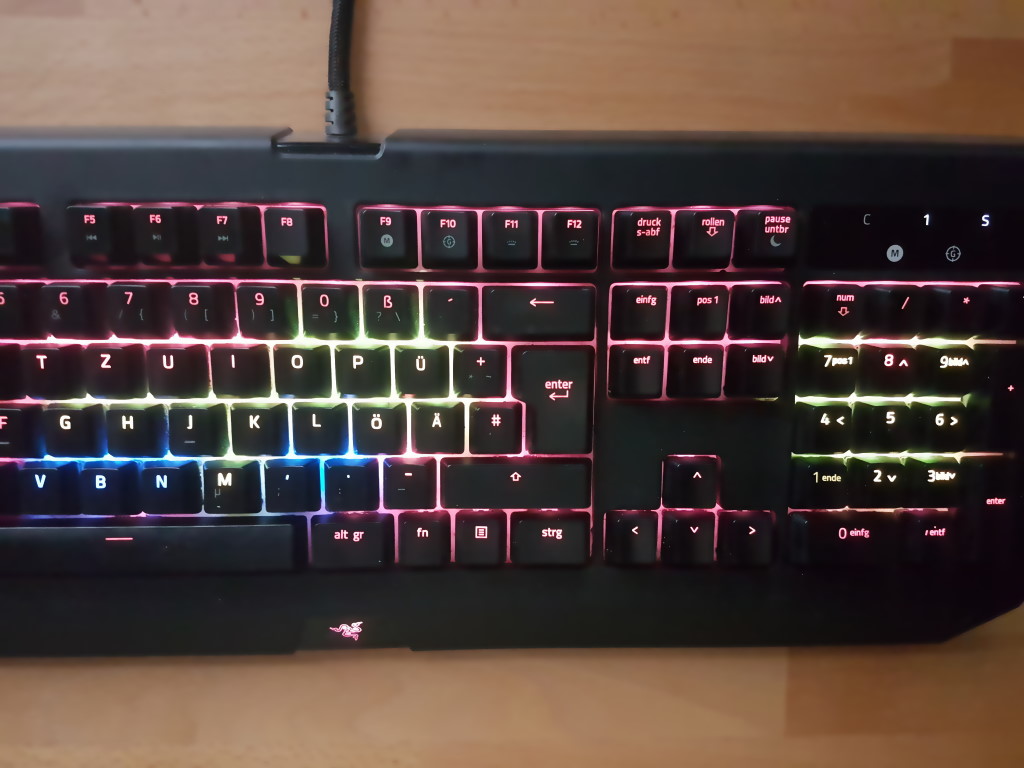
An experimental add-on which shows the capture state of keeps and other objectives in Cyrodiil as color effects on your Razer Chroma keyboard.

The different keeps and objectives are displayed in rows starting from the T, G and V key.

The objectives are mapped to keys in the following order:

  • Aldmeri Dominion
    • Main Keys
      • Castle Bloodmayne
      • Castle Black Boot
      • Castle Faregyl
      • Castle Alessia
      • Castle Roebeck
      • Castle Brindle
      • Nikel Outpost
    • Numpad
      • Vlastarus
      • Scroll of Mnem
      • Scroll of Altadoon
  • Daggerfall Covenant
    • Main Keys
      • Fort Rayles
      • Fort Warden
      • Fort Glademist
      • Fort Ash
      • Fort Aleswell
      • Fort Dragonclaw
      • Bleaker’s Outpost
    • Numpad
      • Bruma
      • Scroll of Alma Ruma
      • Scroll of Ni-Mohk
  • Ebonheart Pact
    • Main Keys
      • Kingscrest Keep
      • Farragut Keep
      • Arrius Keep
      • Chalman Keep
      • Blue Road Keep
      • Drakelowe Keep
      • Sejanus Outpost
    • Numpad
      • Cropsford
      • Scroll of Chim
      • Scroll of Ghartok

The alliances are assigned to the rows starting with your own alliance and follow the order above.

Version: 1.0
Uploaded: 2020-06-29 21:22
To download this content, you must be a member of sirinsidiator's Patreon at $10 or more

InteractionItemCount

A simple add-on that shows the number of items you own on the interaction prompt for crafting nodes or similar.

For items which can be refined it will show both the raw and refined item count.

This currently works for most smithing, clothier, woodworking, jewellery crafting and alchemy materials and some critters. Only English client language is supported for now.

Version: 0.1.0
Uploaded: 2020-03-03 18:27
To download this content, you must be a member of sirinsidiator's Patreon at $10 or more